Enterprise AI Factory
Give every team in your organization a production-grade AI environment without the overhead of managing separate clusters. Production ML teams get private GPU nodes and full isolation. Dev and experiment teams share a node pool and provision on demand. Platform keeps everything governed, audited, and within budget.
Customer access model: Internal teams with Kubernetes access, tiered by trust and workload. Worker-node model: Private nodes for production ML teams, shared nodes for trusted internal dev and experiment tiers.
Typical stack: Platform on an existing cloud Kubernetes cluster or Standalone on-premises. Private nodes for production ML teams. Shared node pool for dev and experiment workloads. vMetal optional for on-premises GPU fleets.
Shared nodes are a supported, common model for trusted tenants. They give each tenant control-plane, API, and namespace isolation, but tenant workloads share the same kernel and physical nodes. They aren't a security boundary for untrusted tenants with Kubernetes access or arbitrary workload execution. Good fits are development, testing, CI/CD, and internal engineering teams.
Use private nodes for external, resale, regulated, or otherwise untrusted tenant offerings, optionally with vNode for runtime isolation.
NetworkPolicy is an added isolation layer worth enabling even for trusted tenants. vCluster can create the policies for you through policies.networkPolicy, and your control plane cluster's CNI enforces them. Confirm your CNI supports enforcement, since some accept NetworkPolicy resources without acting on them. See the security baseline.
If you accept shared nodes for a trusted-tenant use case, follow the shared-node hardening guide as the required next step.
This path serves your organization's own teams. The shared node tier is for internal dev and experiment workloads only. If you serve external customers or resell access, use the AI Cloud path, which gives each customer private nodes.
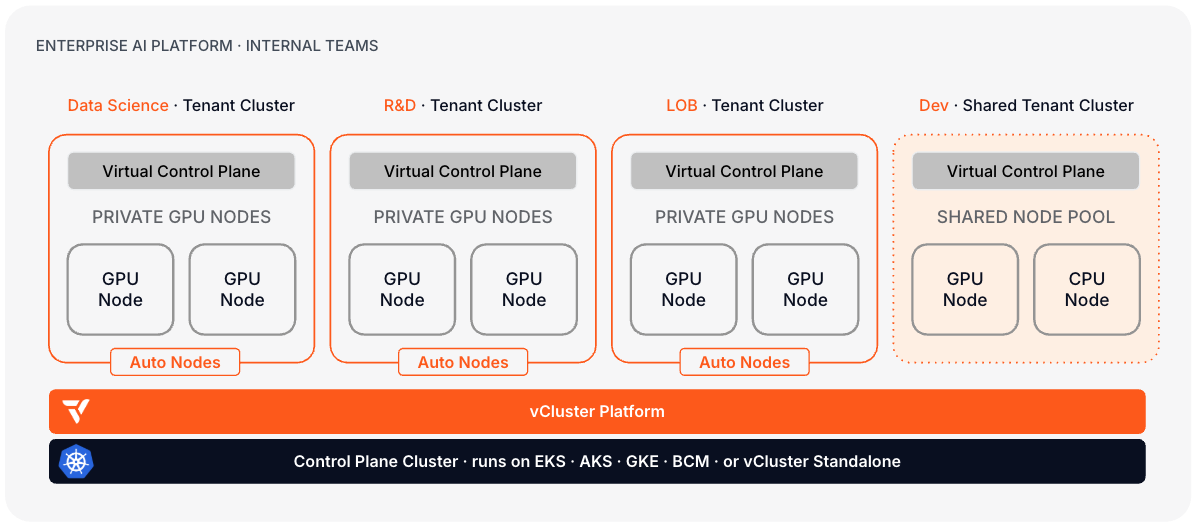
What makes this path different: Your teams use Platform directly, or through an internal portal built on top of it. Self-service provisioning, standardized GPU environments, and chargeback visibility are what you are building toward.
Day 0: Design decisions
| Decision | Read next | Outcome |
|---|---|---|
| Decide the Control Plane Cluster foundation | Architecture, Deployment basics | Run the Control Plane Cluster on an existing managed Kubernetes service (EKS, AKS, GKE) or vCluster Standalone on on-premises servers. |
| Define team tenancy tiers | Private Nodes, Deployment basics | Classify teams: production AI workloads on private GPU nodes, and dev and experiment workloads on shared nodes. |
| Define project and quota structure | Projects, Quotas | Map projects to teams or business units. Set GPU, CPU, and memory quotas per project. |
| Plan GPU tooling and AI stacks | Stacks, Certified Stacks | Use StackTemplates to standardize ordered application deployment. Platform 4.12 includes Certified StackTemplates for dedicated and central NVIDIA Run:ai deployment models; create your own StackTemplates for other schedulers or developer environments. |
| Choose the runtime isolation model | vNode docs | vNode is recommended when teams run agentic workloads, untrusted code execution, or need root access inside containers without the risk of node escape. |
| Plan SSO and governance | SSO, RBAC | Integrate with your corporate identity provider. Define which teams can self-service create clusters and which require approval. |
Day 1: Stand up the first production environment
- Install vCluster Platform on your Control Plane Cluster.
- Configure SSO, teams, and permissions against your corporate identity provider.
- Create projects, templates, and quotas per team or business unit.
- Configure the shared node pool: pod security standard, network policy, and resource quota.
- Configure private GPU nodes for production teams: join nodes manually or configure Auto Nodes.
- Set up vMetal if on-premises GPU servers are part of the fleet.
- If you use NVIDIA Run:ai, choose a supported deployment model and install the Run:ai Certified Stacks. Otherwise, create a StackTemplate for your GPU applications and scheduler, then deploy it to the tenant environment.
- Install vNode on nodes designated for agentic or privileged workloads.
- Provision the first tenant clusterClusterA fully isolated Kubernetes environment provisioned for a single tenant. Each cluster has its own API server, controller manager, and resource namespace, backed by a virtualized control plane hosted on a control plane cluster. From the tenant's perspective it behaves exactly like a standard Kubernetes cluster. for each tier (shared and private) and validate GPU access, quota enforcement, and network isolation. For shared tiers, confirm the control plane cluster's CNI enforces NetworkPolicy. With
sync.toHost.networkPoliciesenabled, apply a default-deny policy and confirm the blocked connection is refused. See the security baseline. - Document how teams request clusters, retrieve kubeconfigs, request quota increases, and report issues.
Day 2: Operate
| Operation | Read next |
|---|---|
| Monitor platform and team workloads | Fleet Observability, other architectures |
| Manage private node capacity | Auto Nodes, manage private nodes |
| Upgrade clusters and Platform | Upgrade vCluster, upgrade Platform |
| Back up and restore | Snapshots, Platform backup |