Edge Distribution
Deploy tenant workloads at distributed edge sites without managing a separate cluster at each one. Telecommunications providers, ISPs, and edge compute operators use this model to run low-latency services at POPs, exchange points, and remote facilities from a single central control planeControl PlaneThe container orchestration layer that exposes the API and interfaces to define, deploy, and manage the lifecycle of containers. In vCluster, each cluster has its own control plane components..
Customer access model: Each tenant gets an isolated cluster whose workloads schedule onto dedicated edge nodes. Worker-node model: Private nodes, joined from each edge site.
Typical stack: Central Standalone (HA) as the control plane cluster. Central vClustervClusterAn open-source software product that creates and manages clusters within Kubernetes infrastructure. vCluster provides tenant isolation capabilities while reducing infrastructure costs. Platform. Worker nodes at each edge site joined to the central control plane using VPN. Tenant control planes run centrally; pods schedule onto edge nodes.
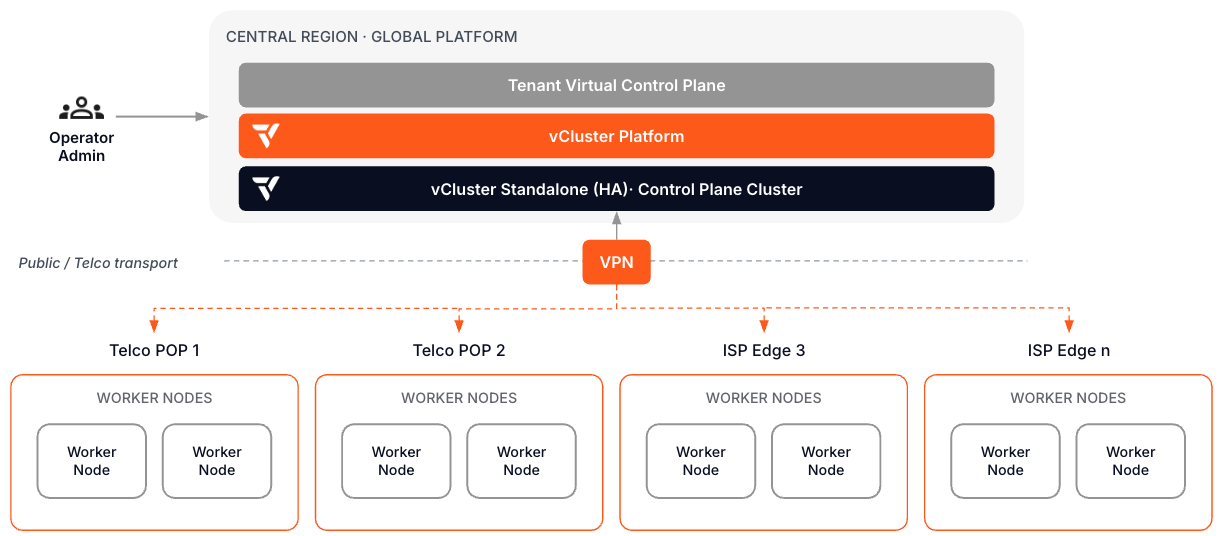
What makes this path different: The compute is distributed but the control plane is not. Your ops team manages the full fleet from one place. Tenants get a standard Kubernetes experience regardless of which edge site their workload lands on.
Day 0: Design decisions
| Decision | Read next | Outcome |
|---|---|---|
| Design the central-edge topology | Standalone deployment, VPN | Central Standalone hosts all tenant control planes. Edge sites contribute worker nodes over VPN. |
| Define edge site requirements | Node requirements | Document the OS, networking, and connectivity requirements for each edge site before joining nodes. |
| Plan node labeling and scheduling | Private Nodes | Label nodes by site, region, or tier so tenant workloads can be scheduled to the correct edge location. |
| Plan tenant isolation at edge | vNode docs | Decide whether edge workloads need runtime isolation, especially for multi-tenant edge sites. |
Day 1: Stand up the first edge site
- Deploy vCluster Standalone centrally and move to HA.
- Install vCluster Platform and configure SSO and permissions.
- Establish VPN connectivity to the first edge site.
- Join edge site nodes to the central control plane clusterControl plane clusterThe Kubernetes cluster that hosts the virtualized control planes for clusters. The control plane cluster is operated by the platform provider and is completely invisible to tenants. There are no shared control plane nodes, no in-cluster agent pods, and no lateral path between tenant environments. With shared nodes, this cluster also runs tenant workloads alongside the control plane pods — the same node pool is used for both.. Apply site labels.
- Create a template that schedules tenant workloads to the correct edge site using node selectors or affinity rules.
- Provision a test tenant clusterClusterA fully isolated Kubernetes environment provisioned for a single tenant. Each cluster has its own API server, controller manager, and resource namespace, backed by a virtualized control plane hosted on a control plane cluster. From the tenant's perspective it behaves exactly like a standard Kubernetes cluster.. Validate that pods land on the intended edge nodes.
- Document the site onboarding playbook. Repeat steps 3-6 for each additional edge site.
Day 2: Operate
| Operation | Read next |
|---|---|
| Monitor edge nodes and tenant workloads | Fleet Observability, other architectures |
| Add and remove edge sites | Site onboarding playbook (internal), VPN |
| Upgrade tenant clusters and Platform | Upgrade vCluster, upgrade Platform |
| Handle site connectivity failures | Platform HA, multi-region Platform |